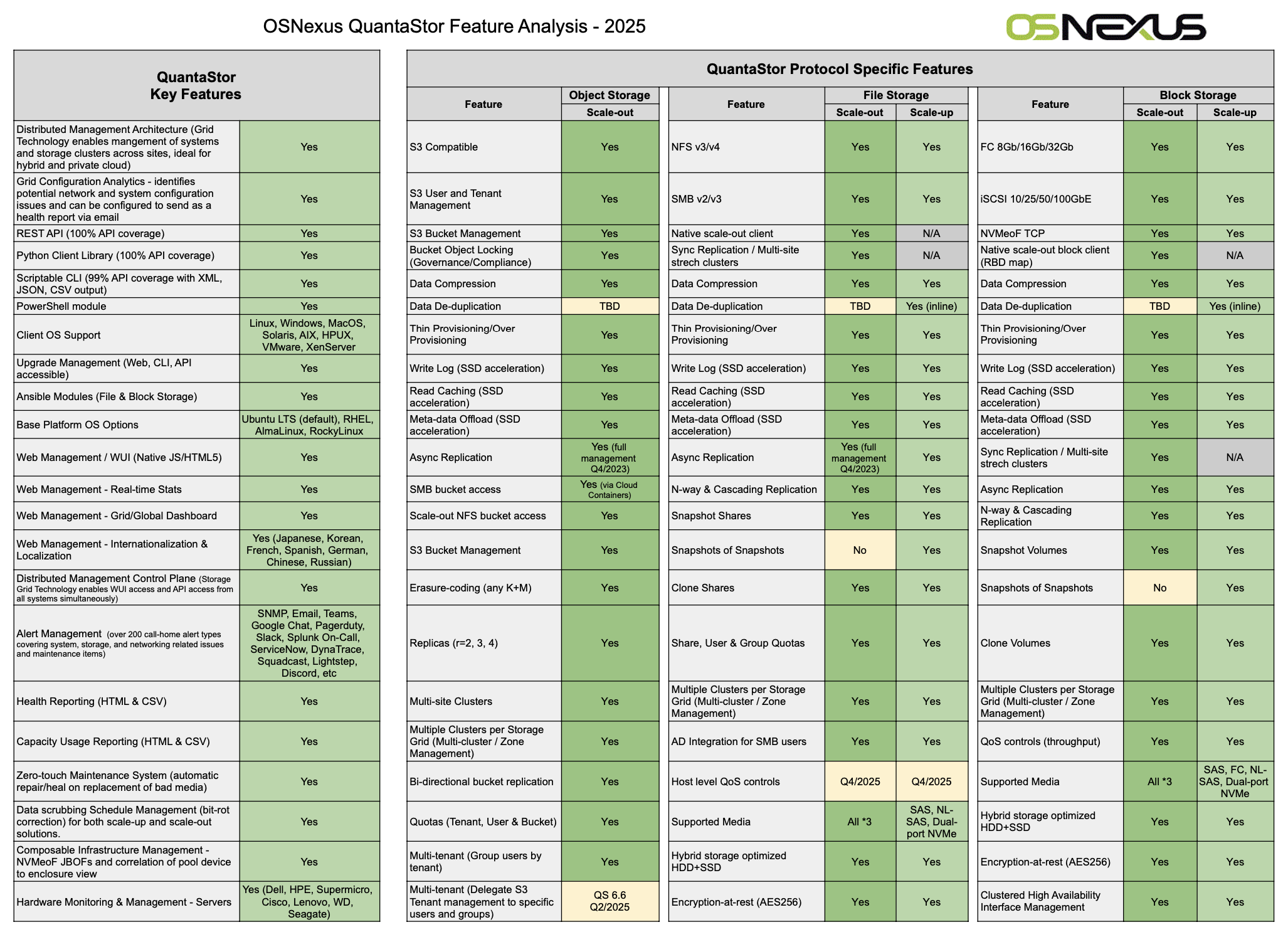
Key Features

Feature Description
10GbE & 1GbE iSCSI Support QuantaStor was designed to be the easiest iSCSI SAN on the market to manage and deploy with native support for both 1GbE and most of the latest 10GbE network adapters.
Fibre Channel Support Easily add 8Gb or 4Gb Fibre Channel to your QuantaStor SAN using the QLogic 24xx or 25xx generation of Fibre Channel HBAs.
NFSv3 & NFSv4 Support NFS 'Network Shares' can be created in any Storage Pool and with our Advanced pool type you can create instant snapshots of network shares manually or on a schedule.
Client Support Windows XP, 7, 2003 Server, 2008 Server, VMware ESX/ESXi, Windows Hyper-V, Apple Macintosh OS X, XenServer 5.x, Linux (all major distros, open-iscsi & hardware initiators)
Thin Provisioning / Over Provisioning Thin provisioning is a technology that enables you to allocate volumes without having to dedicate the storage until it is needed. It's a powerful tool because it allows you to eliminate the guess work about how much a given application will require. With thin-provisioning you just make the volume (LUN) as large as you like (up to 2x the size of the storage pool), and then you can add more disk to the storage pool down the road as application demands require.
NIC Teaming / Bonding NIC bonding allows you to bind together multiple network ports to boost aggregate bandwidth. It also gives you fault-tolerance as in the event one of the ports is disconnected traffic will continue to flow on the other connections in a round-robin fashion.
Backup to Amazon S3 Within QuantaStor you can select any storage volume and make a backup of it to the Amazon S3 cloud. To do so you just enter your Amazon S3 credentials and then create a Cloud Container which will represent itself in the Amazon cloud as what's known in S3 nomenclature as a 'bucket'. From there you can select volumes and make backups. With storage volumes using our Advanced pool type you can do backups while the volume is in use and you can create automatic backup schedules for these volumes (LUNs).
Data Compression (beta) All data written to the storage system is compressed automatically. This not only boosts ROI through a boost in effective storage capacity, it also boosts performance as compressed data is quicker to read and write to disk.
Audit Logging QuantaStor automatically logs all operations so that you can easily see what changes were made by who and when.
Network Share Snapshots (beta) Create instant R/W snapshots of your network shares for use as recovery points, stable backup points, or for data-mining. QuantaStor's network share snapshot feature works instantly and even allows one to create snapshots of snapshots.
Data Check-sums (beta) Data integrity checks are automatically computed for both data blocks and meta-data blocks.
Integrated with Citrix Essentials for XenServer & Hyper-V Citrix's Essentials for XenServer & Hyper-V fully automates the storage management tasks involved with deploying new virtual machines, migrating virtual machines, snapshoting & cloning virtual machines and replicating virtual machines. Combined QuantaStor storage clouds you'll be able to control exactly which storage volumes and resources made visible and manageable by your virtual machine administrators through Citrix Essentials.
Unlimited Target Ports Need more bandwidth? You can freely add additional network ports to your system and when combined with multi-path solutions like Microsoft MPIO or Linux's DMMP you'll boost performance and protect yourself from path failures.
Unlimited Sessions You can connect to a given volume (LUN) from all the nodes in your VMWare cluster or Microsoft Windows Failover Cluster without having to worry about upper limits on the initiator connection count found in other storage systems.
Remote Management CLI for Windows & Linux The remote management CLI allows you to easily script the management of your storage system(s). The CLI runs on both Windows and Linux and includes an XML output mode for easy parsing and integration with custom applications and provisioning tools.
Cloud Integration SDK (SOAP / WebServices) This is the 'whole enchilada'. Need to custom integrate your cloud solution or application with the storage system for provisioning or charge-back accounting? Whatever it may be, you can directly integrate with the storage system using the same WebServices APIs we use for QuantaStor Manager and the QuantaStor Remote Management CLI
QuantaStor Manager web management interface QuantaStor Manager is our web based management application for managing your QuantaStor system(s). Simply enter the IP address of your QuantaStor storage system into any major browser and you can manage your storage system from nearly anywhere. QuantaStor Manager is a true web application as it was developed using the latest in Web 2.0 development tools to give you that rich experience you get from a traditional desktop application (no page refreshes) without having to install anything on your desktop. Did we mention it's fast too? It's fast.
Instant Recovery from Snapshot (beta) Deleted a file by mistake, or perhaps you need to recover some files from several weeks back, or recover from a bad driver install? Recovery from these common scenarios is made easy with volumes snapshots. You can automate the creation of snapshots or you can explicitly create one before you make major configuration changes to your servers so that you can quickly recover from anything that goes wrong. To recover to a previous point in time snapshot you just right-click on the volume within the web interface, select 'Restore Storage Volume' and all the relevant restore points will be shown. Just pick one and press OK and that's it. It's that simple, and it's instantaneous.. well, 2.5 seconds instantaneous. To recover a single file from a snapshot just assign the snapshot volume to your host and just click-and-drag to recover the files directly from the snapshot device.
Automated Snapshot Schedules (beta) Snapshot schedules allow one to create automatic snapshots of one or more storage volumes and/or network shares automatically on a schedule. This allows for instant recovery back to a previous point in time to recover lost files or other data. With QuantaStor all snapshots are read-write and any volume snapshot can be instantly 'promoted' to a primary/original storage volume.
CHAP Authentication CHAP stands for 'Challenge-Handshake Authentication Protocol' and it allows you to apply a password on each volume so that you can effectively control and secure access to your LUNs/volumes. QuantaStor also allows you to associate a default password to each user account (and storage cloud) so that users can easily change the CHAP password for all their devices all at once without having to update each volume one by one.
Volume Resize Need to make that storage volume larger, just resize it. Once you grow it you'll need to go to Windows disk manager or other platform specific partitioning tool to grow filesystem on your volume / LUN to utilize the newly available space.
Online Pool Grow/Relayout Running out of disk space? You can hot-plug more drives into the system and grow your storage pool(s) while they're online thereby giving you zero-downtime expandability.
Advanced CHAP management CHAP authentication has always been a challenge to manage and maintain as most storage systems require that a CHAP user/pass be set on each storage volume individually. QuantaStor supports per target/volume CHAP settings, but it also supports a default CHAP settings at a User level and at the Storage Cloud level. This way, as you create volumes within a storage cloud they're automatically protected and when you need to change the CHAP settings you can do it in one place and have it instantly applied to all the storage volumes in the cloud. That not only makes it easier to manage, it makes it must easier to maintain a secure SAN.
RAID Layouts You can create storage pools using any of the major RAID levels including 0,1,5,6 and 10. When you create storage volumes within a storage pool, those volumes inherit the layout properties of the storage pool. So if you have a 10TB RAID6 storage pool made with (7) 2TB disk drives, all the storage volumes you create within that storage pool are protected / fault tolerant RAID6 volumes. Also, with QuantaStor's thin-provisioning capability you can create multiple 20TB volumes in that same 10TB storage pool because the storage is only reserved as it is utilized. (thick-provisioning is also supported)
User Groups User groups represent an arbitrary collection of users and allows administrators to group teams of people together independently from storage clouds. This makes adding teams to multiple clouds easier and reduces complexity.
Storage Volume Groups Databases are often split up between multiple LUNs where one contains the index, another contains the data, and perhaps another contains the database log file. In such cases a given application or machine image will be comprised of multiple storage volumes. Using storage volume groups you can combine these volumes (LUNs) together to improve organization and you can perform macro level operations on the storage volume groups like snapshot and clone.
Host Groups Hosts are often combined into clusters or pools for use with Microsoft MSCS, Hyper-V, VMWare, and XenServer. The host group object allows you to combine these hosts into a group within the storage system so that you can assign storage to all the hosts at once as a group rather than having to painstakingly assign a given volume to each host one at a time. This can be particularly painful with traditional systems when you have to assign several volumes to several hosts. With QuantaStor's easy to use storage assignment dialogs and Host Groups we make it a snap.
Storage Clouds An innovative patent-pending feature that allows you to divide up the storage system into multiple private storage clouds so that the storage system can effectively be utilized and administered by multiple groups of users. Storage clouds enforce a security envelope that ensures that cloud users can only see their resources and those resources that exist within the storage cloud(s) to which they are a member.
Storage Quotas With storage quotas you can set limits on the maximum amount of storage that can be thin-provisioned, the maximum amount of storage that can be physically utilized and the maximum number of volumes that can be provisioned. Storage Quotas are associated with clouds so you only need to create one per cloud and it covers all the users within that cloud. Users can also be members of more than one cloud.
SSD Optimized When combined with LSI MegaRAID controllers and integrated LSI FastPath software you can attain extremely high IOPs numbers with a QuantaStor based SSD solution.
Remote Replication Remote replication allows you to replicate storage volumes and network shares over a LAN or WAN to another QuantaStor system. Ideal for replicating critical work-loads to a disaster recovery site.
Advanced RBAC security model Create custom roles or modify existing ones to better match the needs of your organization. QuantaStor goes beyond basic RBAC by not only allowing you to indicate which actions/operations a given role has permissions for, it allows you to scope that permission to just the user's objects, or to all objects in the user's associated cloud(s), or to the entire system.
Snapshots of Snapshots (beta) You can snapshot any snapshot and they're all writable. Not only that, you can convert/promote any snapshot to primary volume status instantly. This is because snapshots in QuantaStor are really more like intelligent clones.
Volume Utilization Metrics Volume utilization metrics can be collected for a tunable number of days (default is 60) to enabled charge-back accounting based on hourly IO utilization and storage utilization.
Hardware RAID Controller Integration (LSI 3ware, LSI MegaRAID, HP P400, Adaptec 5xxx, Fusion IO) QuantaStor has dynamic plug-in framework for the integration of 3rd party hardware RAID controllers so that you can leverage the advanced capabilities of LSI, HP, Fusion IO and other RAID controllers in a fully integrated fashion. For example, with LSI integration you can create and delete RAID unit, mark universal hot spares, and identify disks and units all via QuantaStor Manager, and the integration module also monitors the health of your RAID units so you'll be notified via email via the QuantaStor alert manager in the event of a disk failure.